> For the complete documentation index, see [llms.txt](https://participanthelp.dscout.com/llms.txt). Markdown versions of documentation pages are available by appending `.md` to page URLs; this page is available as [Markdown](https://participanthelp.dscout.com/getting-started/dscout-overview/apply-for-a-study-through-a-private-screener.md).
# Apply for a study through a private screener
So, you’ve been invited to apply to your first Dscout study—congrats! We’re happy you’re here. But we also understand you might have a few questions if you’ve never used Dscout (or even heard of us!) before. In this article, we’ll answer those questions by walking you through what you can expect from the process.
{% hint style="info" %}
**Note:** Applying to a study through a private screener does not require you to create a Dscout account. You will not be added to our platform’s participant panel, nor will we invite you to join unsolicited studies in the future.
{% endhint %}
## Access the screener
At Dscout, we refer to research studies as “studies,” and to apply to a study, you’ll fill out a screener. Chances are good you’ve already received a link from someone who wants to hear from you (we’ll refer to them as the Researcher). And once you open that link, you’ll land on a screener webpage that looks something like this:
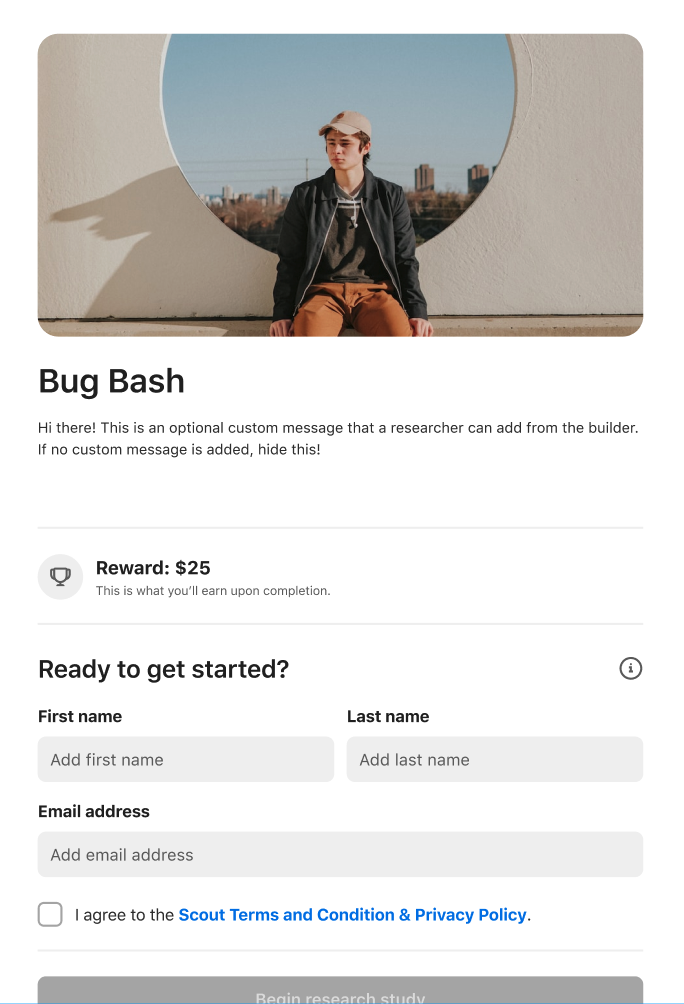 On this page, we’ll ask you for some basic information (name, email, etc.), and we’ll also ask you to agree to our [Scout Terms and Conditions & Privacy Policy](https://dscout.com/legal/scout-terms). Once you’ve done that, click **Begin research study** to dive in.
{% hint style="info" %}
**Note:** If you’ve never logged in to Dscout before, you’ll be asked to verify your email. Simply follow the link that’s sent to you from — be sure to check your spam folder — and you’ll land directly in the screener.
{% endhint %}
## Complete the screener
Once you’re in the screener, simply answer the questions that are presented to you. Answer honestly and truthfully—don’t try to guess what the Researcher might want to hear. Chances are good you’ll end up guessing incorrectly and be disqualified when your honest answers would have earned you some extra cash.
## What happens next?
Based on your answers to the screener, you’ll either be accepted or rejected for the research study. This could happen within the same day or it could happen a day or two after you submit your screener responses.
If you’re accepted for the study, you’ll receive an email from letting you know. In this email, you’ll find another link with details on how to get started.
---
# Agent Instructions
This documentation is published with GitBook. GitBook is the documentation platform designed so that both humans and AI agents can read, navigate, and reason over technical content effectively. Learn more at gitbook.com.
## Querying This Documentation
If you need additional information that is not directly available in this page, you can query the documentation by asking a question.
Perform an HTTP GET request on the following URL with the `ask` and `goal` query parameters:
```
GET https://participanthelp.dscout.com/getting-started/dscout-overview/apply-for-a-study-through-a-private-screener.md?ask=&goal=
```
`ask` is the immediate question: it should be specific, self-contained, and written in natural language.
`goal` is what the user is ultimately trying to achieve, the reason they need the answer. Sharing it helps GitBook give you a better, more relevant answer. A goal is most helpful when it describes the outcome the user wants rather than restating the question. For example, with `ask=how do I create an API token`, a goal like `automate deployments from our CI pipeline` lets GitBook tailor the answer to that use case.
The response will contain a direct answer to the question and relevant excerpts and sources from the documentation.
Use this mechanism when the answer is not explicitly present in the current page, you need clarification or additional context, or you want to retrieve related documentation sections.
On this page, we’ll ask you for some basic information (name, email, etc.), and we’ll also ask you to agree to our [Scout Terms and Conditions & Privacy Policy](https://dscout.com/legal/scout-terms). Once you’ve done that, click **Begin research study** to dive in.
{% hint style="info" %}
**Note:** If you’ve never logged in to Dscout before, you’ll be asked to verify your email. Simply follow the link that’s sent to you from — be sure to check your spam folder — and you’ll land directly in the screener.
{% endhint %}
## Complete the screener
Once you’re in the screener, simply answer the questions that are presented to you. Answer honestly and truthfully—don’t try to guess what the Researcher might want to hear. Chances are good you’ll end up guessing incorrectly and be disqualified when your honest answers would have earned you some extra cash.
## What happens next?
Based on your answers to the screener, you’ll either be accepted or rejected for the research study. This could happen within the same day or it could happen a day or two after you submit your screener responses.
If you’re accepted for the study, you’ll receive an email from letting you know. In this email, you’ll find another link with details on how to get started.
---
# Agent Instructions
This documentation is published with GitBook. GitBook is the documentation platform designed so that both humans and AI agents can read, navigate, and reason over technical content effectively. Learn more at gitbook.com.
## Querying This Documentation
If you need additional information that is not directly available in this page, you can query the documentation by asking a question.
Perform an HTTP GET request on the following URL with the `ask` and `goal` query parameters:
```
GET https://participanthelp.dscout.com/getting-started/dscout-overview/apply-for-a-study-through-a-private-screener.md?ask=&goal=
```
`ask` is the immediate question: it should be specific, self-contained, and written in natural language.
`goal` is what the user is ultimately trying to achieve, the reason they need the answer. Sharing it helps GitBook give you a better, more relevant answer. A goal is most helpful when it describes the outcome the user wants rather than restating the question. For example, with `ask=how do I create an API token`, a goal like `automate deployments from our CI pipeline` lets GitBook tailor the answer to that use case.
The response will contain a direct answer to the question and relevant excerpts and sources from the documentation.
Use this mechanism when the answer is not explicitly present in the current page, you need clarification or additional context, or you want to retrieve related documentation sections.