> For the complete documentation index, see [llms.txt](https://participanthelp.dscout.com/llms.txt). Markdown versions of documentation pages are available by appending `.md` to page URLs; this page is available as [Markdown](https://participanthelp.dscout.com/getting-started/dscout-app/minimum-device-requirements.md).
# Minimum device requirements
Dscout has a few technical requirements, and what's required depends on the type of study you're participating in and the device you use. Most studies happen in the Dscout mobile app, but some—like AI moderated studies, intercept studies, and desktop interviews—take place on a desktop or laptop computer in your web browser. Read more below or choose one of the following options that best describes you:
## Minimum device requirements for Android mobile devices
In order for Dscout to be compatible on your Android device, your phone must **(1)** be running on an operating system (OS) no older than **Android 9.0 (Pie)** and **(2)** have a working camera and microphone.
If you don’t know what OS version your mobile device is using, try following these steps to figure out what version your Android device is currently running on:
1. Open your mobile device’s **Settings** app.
2. Search for a section called **System**.
3. Find and tap on the section named **About** or **About phone**.
4. Look for a field that says **Android version**.
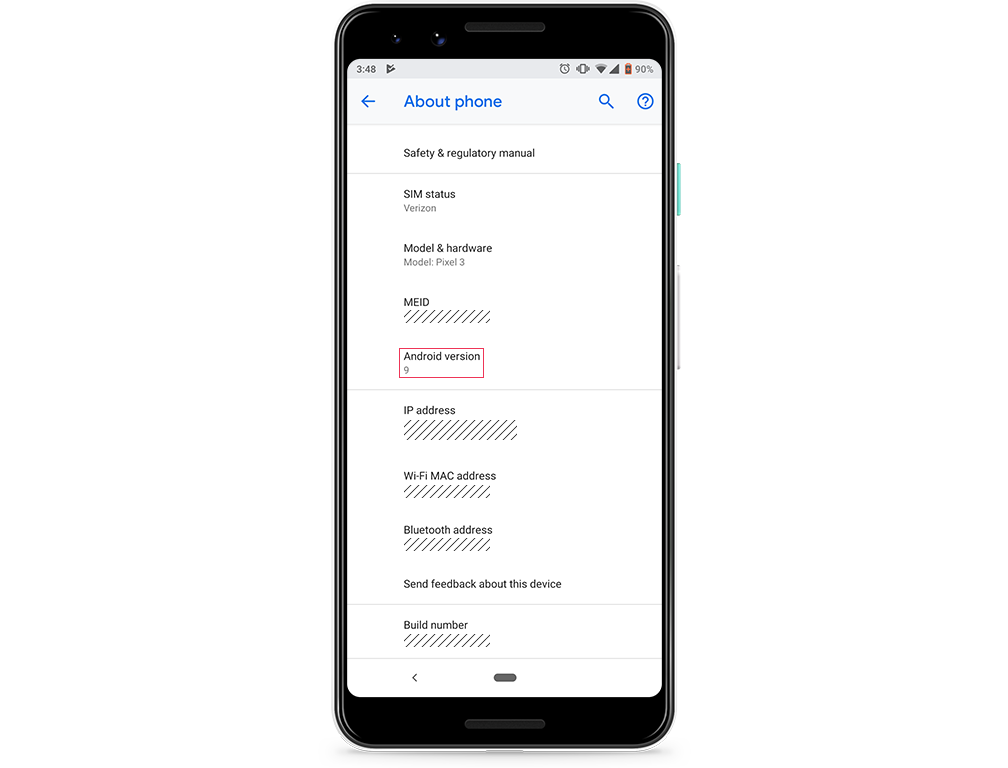 If your mobile device isn’t on at least **Android Pie (9.0)** or doesn’t have a camera and microphone, you won't be able to download the Dscout app.
{% hint style="info" %}
**Note:** Not all Android devices are the same. These steps are general, so you may need to dig a little to find your phone’s operating system.
{% endhint %}
## Minimum device requirements for iOS mobile devices
In order for Dscout to be compatible on your Apple device, your phone must **(1)** be running on **iOS 16.0** or higher and **(2)** have a working camera and microphone.
If you don’t know what OS version your iPhone is running, you can follow these steps to find out:
1. Tap on your phone’s **Settings** app.
2. Tap on **General**.
3. Tap on **About**.
4. Scroll down and look for the information next to **Version**.
If your mobile device isn’t on at least **Android Pie (9.0)** or doesn’t have a camera and microphone, you won't be able to download the Dscout app.
{% hint style="info" %}
**Note:** Not all Android devices are the same. These steps are general, so you may need to dig a little to find your phone’s operating system.
{% endhint %}
## Minimum device requirements for iOS mobile devices
In order for Dscout to be compatible on your Apple device, your phone must **(1)** be running on **iOS 16.0** or higher and **(2)** have a working camera and microphone.
If you don’t know what OS version your iPhone is running, you can follow these steps to find out:
1. Tap on your phone’s **Settings** app.
2. Tap on **General**.
3. Tap on **About**.
4. Scroll down and look for the information next to **Version**.
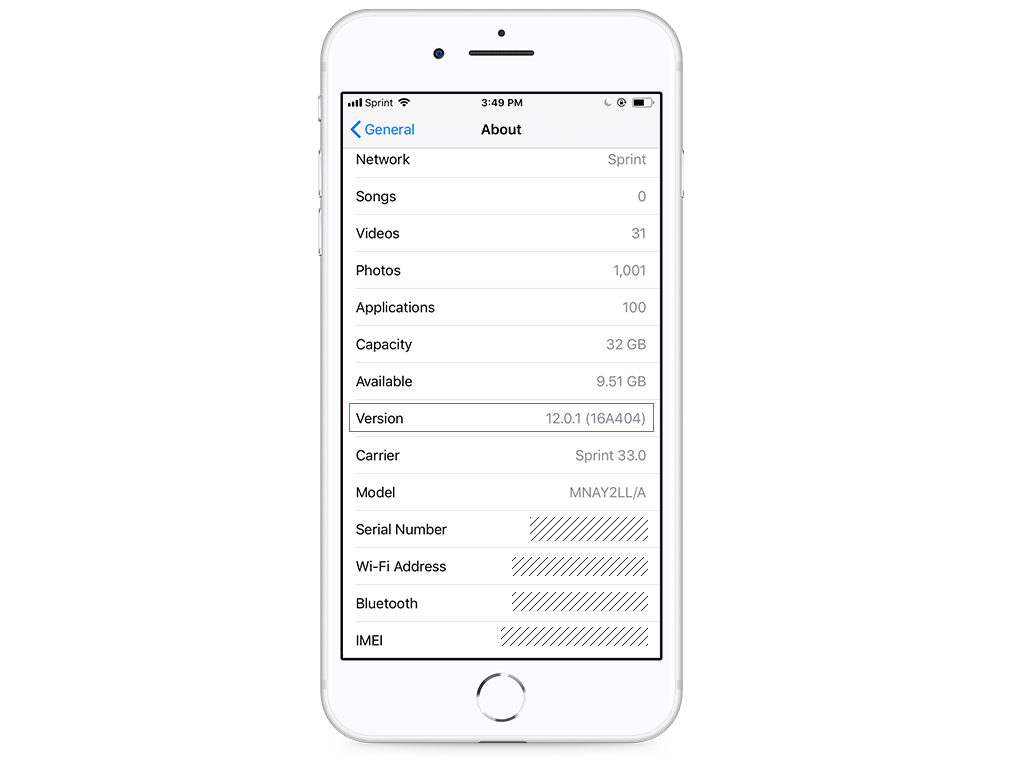 If your operating system is not iOS 16.0 or higher or if your iPhone doesn’t have a functioning camera and microphone, you won't be able to download the Dscout app.
## Desktop for certain studies
As a Scout, most of your Dscout activity happens on your mobile device using the Dscout mobile app. However, some studies take place on a desktop or laptop computer instead—including AI moderated studies, intercept studies, desktop interview sessions, and desktop activities for diary studies, usability tests, and media surveys.
### **Interview study**
If you're participating in a desktop interview study (specified in your study invite and study overview in the app), your computer must **(1)** be a desktop or laptop computer, **(2)** have a working camera and microphone, and **(3)** have Chrome version 80 or higher downloaded, or Microsoft Edge version 130 or higher. Before your session, we'll run a system check to be sure your device meets these requirements; read more about the interview pre-test here.
### **Desktop diary activities**
If you're participating in a diary study that includes a desktop activity, your computer must **(1)** be a desktop or laptop computer, **(2)** have a working camera and microphone, and **(3)** have Chrome version 80 or higher, or Microsoft Edge version 130 or higher, downloaded.
{% hint style="info" %}
**Note:** Desktop diary activities **don't require the Dscout browser extension**. You complete them right in your browser, and you won't be asked to install anything.
{% endhint %}
### **Desktop usability tests, media surveys, and more**
If you're participating in a usability test or other study that includes a desktop activity, your computer must **(1)** be a desktop or laptop computer, **(2)** have a working camera and microphone, and **(3)** have Chrome version 80 or higher, or Microsoft Edge version 130 or higher, downloaded. For usability tests, you'll also need to be able to download the Dscout browser extension (available for Google Chrome and Microsoft Edge via the Chrome Store).
{% hint style="info" %}
**Note:** Earlier versions of Edge may work. We guarantee optimal performance with version 130 or higher.
{% endhint %}
### **AI moderated study**
If you're participating in an AI moderated study, your computer must **(1)** be a desktop or laptop computer, **(2)** have a working camera and microphone, and **(3)** have Google Chrome or Microsoft Edge downloaded. You'll also be asked to share your screen during the session. Some AI moderated studies ask you to sign in or create a Dscout account and/or install the Dscout browser extension before you begin. AI moderated studies aren't available on phones or tablets—learn more in [Participate in AI moderated studies](/ai-moderated-studies/participate-in-ai-moderated-studies.md).
### **Intercept study**
If you're participating in an intercept study, you'll use a desktop or laptop computer with **(1)** Google Chrome or Microsoft Edge and **(2)** the Dscout browser extension installed. Intercept studies aren't available on phones or tablets—learn more in the Intercept studies FAQ.
## Can I use a tablet to participate on Dscout?
In short, it depends on what you're doing with Dscout!
The Dscout app is designed for mobile phones; since the Dscout app is optimized for mobile phones, we can't guarantee a seamless tablet experience. That being said, you should be able to complete **applications** and participate in mobile **diary studies** on an iPad or Android tablet if you don't have access to a mobile device! You can access the Dscout app for iOS [here](https://itunes.apple.com/us/app/dscout/id395563123) and the Android app [here](https://play.google.com/store/apps/details?id=com.vokal.dscout\&hl=en). Keep in mind that your tablet will still need to meet the Android or iOS tech requirements specified in the sections above.
At this time, **interview studies** (both desktop and mobile studies) **is not compatible with tablets.** **AI moderated studies** and **intercept studies** also require a desktop or laptop computer, not a tablet.
---
# Agent Instructions
This documentation is published with GitBook. GitBook is the documentation platform designed so that both humans and AI agents can read, navigate, and reason over technical content effectively. Learn more at gitbook.com.
## Querying This Documentation
If you need additional information that is not directly available in this page, you can query the documentation by asking a question.
Perform an HTTP GET request on the following URL with the `ask` and `goal` query parameters:
```
GET https://participanthelp.dscout.com/getting-started/dscout-app/minimum-device-requirements.md?ask=&goal=
```
`ask` is the immediate question: it should be specific, self-contained, and written in natural language.
`goal` is what the user is ultimately trying to achieve, the reason they need the answer. Sharing it helps GitBook give you a better, more relevant answer. A goal is most helpful when it describes the outcome the user wants rather than restating the question. For example, with `ask=how do I create an API token`, a goal like `automate deployments from our CI pipeline` lets GitBook tailor the answer to that use case.
The response will contain a direct answer to the question and relevant excerpts and sources from the documentation.
Use this mechanism when the answer is not explicitly present in the current page, you need clarification or additional context, or you want to retrieve related documentation sections.
If your operating system is not iOS 16.0 or higher or if your iPhone doesn’t have a functioning camera and microphone, you won't be able to download the Dscout app.
## Desktop for certain studies
As a Scout, most of your Dscout activity happens on your mobile device using the Dscout mobile app. However, some studies take place on a desktop or laptop computer instead—including AI moderated studies, intercept studies, desktop interview sessions, and desktop activities for diary studies, usability tests, and media surveys.
### **Interview study**
If you're participating in a desktop interview study (specified in your study invite and study overview in the app), your computer must **(1)** be a desktop or laptop computer, **(2)** have a working camera and microphone, and **(3)** have Chrome version 80 or higher downloaded, or Microsoft Edge version 130 or higher. Before your session, we'll run a system check to be sure your device meets these requirements; read more about the interview pre-test here.
### **Desktop diary activities**
If you're participating in a diary study that includes a desktop activity, your computer must **(1)** be a desktop or laptop computer, **(2)** have a working camera and microphone, and **(3)** have Chrome version 80 or higher, or Microsoft Edge version 130 or higher, downloaded.
{% hint style="info" %}
**Note:** Desktop diary activities **don't require the Dscout browser extension**. You complete them right in your browser, and you won't be asked to install anything.
{% endhint %}
### **Desktop usability tests, media surveys, and more**
If you're participating in a usability test or other study that includes a desktop activity, your computer must **(1)** be a desktop or laptop computer, **(2)** have a working camera and microphone, and **(3)** have Chrome version 80 or higher, or Microsoft Edge version 130 or higher, downloaded. For usability tests, you'll also need to be able to download the Dscout browser extension (available for Google Chrome and Microsoft Edge via the Chrome Store).
{% hint style="info" %}
**Note:** Earlier versions of Edge may work. We guarantee optimal performance with version 130 or higher.
{% endhint %}
### **AI moderated study**
If you're participating in an AI moderated study, your computer must **(1)** be a desktop or laptop computer, **(2)** have a working camera and microphone, and **(3)** have Google Chrome or Microsoft Edge downloaded. You'll also be asked to share your screen during the session. Some AI moderated studies ask you to sign in or create a Dscout account and/or install the Dscout browser extension before you begin. AI moderated studies aren't available on phones or tablets—learn more in [Participate in AI moderated studies](/ai-moderated-studies/participate-in-ai-moderated-studies.md).
### **Intercept study**
If you're participating in an intercept study, you'll use a desktop or laptop computer with **(1)** Google Chrome or Microsoft Edge and **(2)** the Dscout browser extension installed. Intercept studies aren't available on phones or tablets—learn more in the Intercept studies FAQ.
## Can I use a tablet to participate on Dscout?
In short, it depends on what you're doing with Dscout!
The Dscout app is designed for mobile phones; since the Dscout app is optimized for mobile phones, we can't guarantee a seamless tablet experience. That being said, you should be able to complete **applications** and participate in mobile **diary studies** on an iPad or Android tablet if you don't have access to a mobile device! You can access the Dscout app for iOS [here](https://itunes.apple.com/us/app/dscout/id395563123) and the Android app [here](https://play.google.com/store/apps/details?id=com.vokal.dscout\&hl=en). Keep in mind that your tablet will still need to meet the Android or iOS tech requirements specified in the sections above.
At this time, **interview studies** (both desktop and mobile studies) **is not compatible with tablets.** **AI moderated studies** and **intercept studies** also require a desktop or laptop computer, not a tablet.
---
# Agent Instructions
This documentation is published with GitBook. GitBook is the documentation platform designed so that both humans and AI agents can read, navigate, and reason over technical content effectively. Learn more at gitbook.com.
## Querying This Documentation
If you need additional information that is not directly available in this page, you can query the documentation by asking a question.
Perform an HTTP GET request on the following URL with the `ask` and `goal` query parameters:
```
GET https://participanthelp.dscout.com/getting-started/dscout-app/minimum-device-requirements.md?ask=&goal=
```
`ask` is the immediate question: it should be specific, self-contained, and written in natural language.
`goal` is what the user is ultimately trying to achieve, the reason they need the answer. Sharing it helps GitBook give you a better, more relevant answer. A goal is most helpful when it describes the outcome the user wants rather than restating the question. For example, with `ask=how do I create an API token`, a goal like `automate deployments from our CI pipeline` lets GitBook tailor the answer to that use case.
The response will contain a direct answer to the question and relevant excerpts and sources from the documentation.
Use this mechanism when the answer is not explicitly present in the current page, you need clarification or additional context, or you want to retrieve related documentation sections.