> For the complete documentation index, see [llms.txt](https://participanthelp.dscout.com/llms.txt). Markdown versions of documentation pages are available by appending `.md` to page URLs; this page is available as [Markdown](https://participanthelp.dscout.com/diary-studies/participate-in-diary-studies/what-kinds-of-questions-do-i-answer-in-studies-and-applications.md).
# What kinds of questions do I answer in studies and applications
An **Entry** is the set of answers you submit when participating in a study. Typically, you’ll submit multiple entries while participating in a single study, but each study will require at least one entry per activity. (Don't remember what an activity is? Read more [here](/diary-studies/participate-in-diary-studies.md))
There are eight different types of questions, which are listed below.
## Open-ended questions
Open-ended questions ask you to respond in a free-form, text-based manner. Answers to open-ended questions may have a limit of 140 characters.
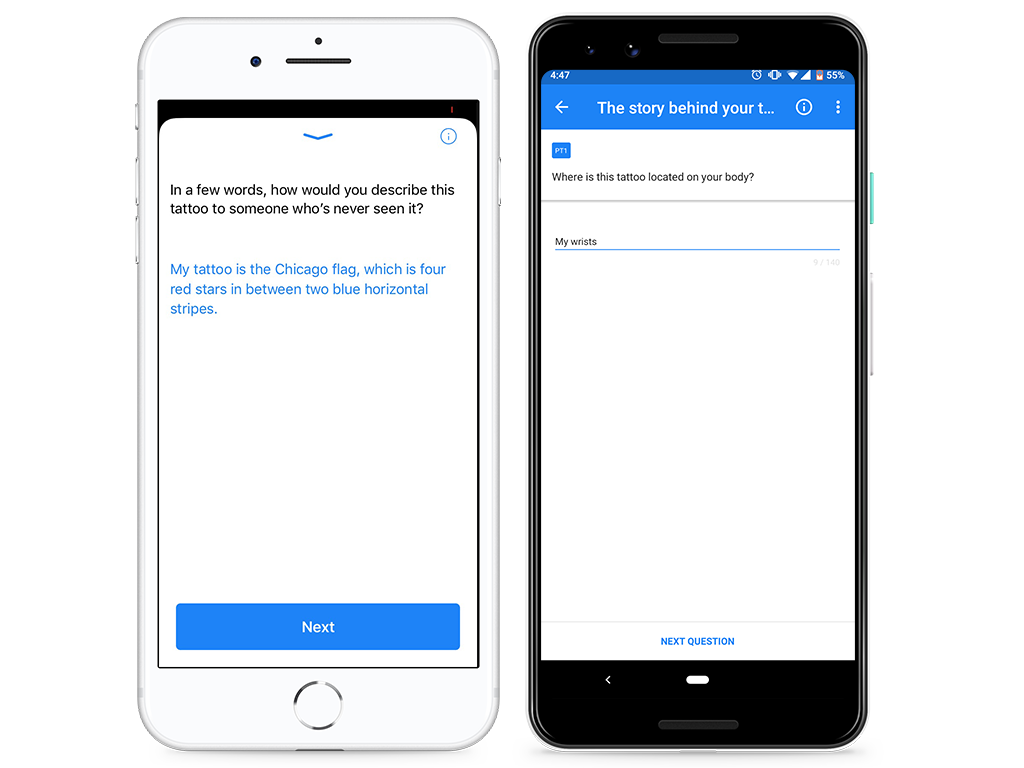 ***Pro tip**: If your entry has a limit of 140 characters, you'll see the number 140 somewhere on the screen (this number will be on the bottom-left corner for iPhones and right under the text box on the right for Android devices). When you type your answer, the number will decrease. If you don't see a number anywhere on the screen, then you can add as many characters as you want.*
## Multiple choice questions
Multiple choice questions ask you to select one or more choices from a list.
***Pro tip**: If your entry has a limit of 140 characters, you'll see the number 140 somewhere on the screen (this number will be on the bottom-left corner for iPhones and right under the text box on the right for Android devices). When you type your answer, the number will decrease. If you don't see a number anywhere on the screen, then you can add as many characters as you want.*
## Multiple choice questions
Multiple choice questions ask you to select one or more choices from a list.
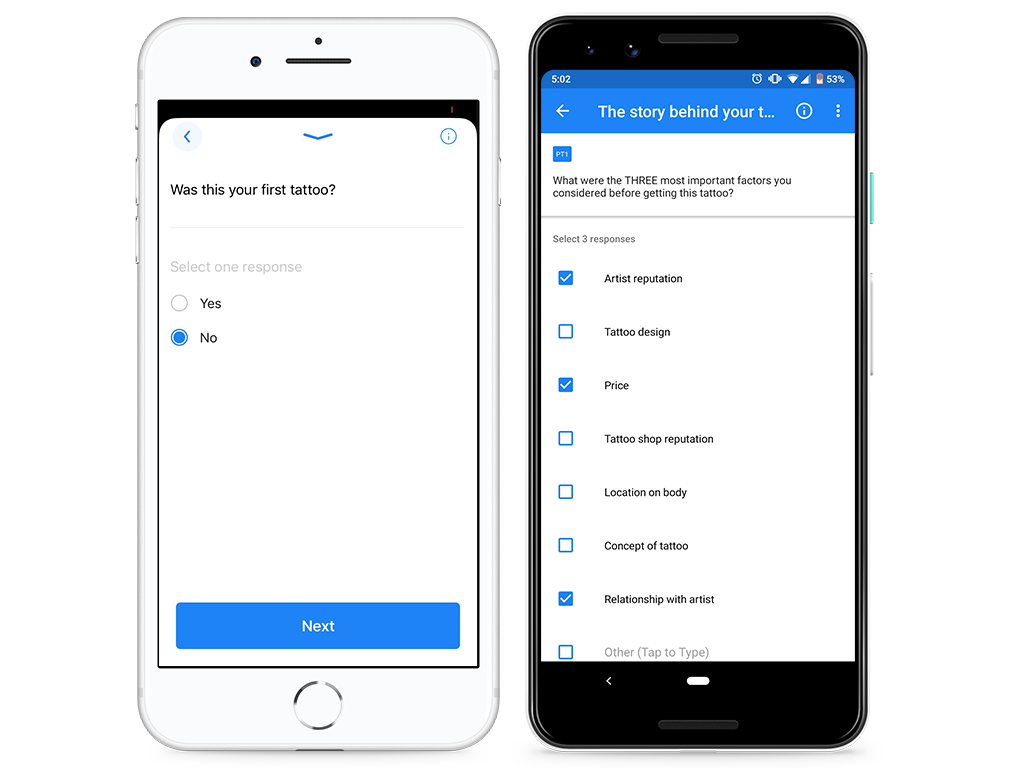 ***Pro tip:** You'll notice the number of choices you're supposed to select underneath the question prompt in gray.*
## Ranking questions
Ranking questions ask you to rank some or all of the response choices from a list. The number of choices you need to rank will be specified above the choice list (e.g. "Rank all 6 choices," "Rank 1 to 3 choices").
***Pro tip:** You'll notice the number of choices you're supposed to select underneath the question prompt in gray.*
## Ranking questions
Ranking questions ask you to rank some or all of the response choices from a list. The number of choices you need to rank will be specified above the choice list (e.g. "Rank all 6 choices," "Rank 1 to 3 choices").
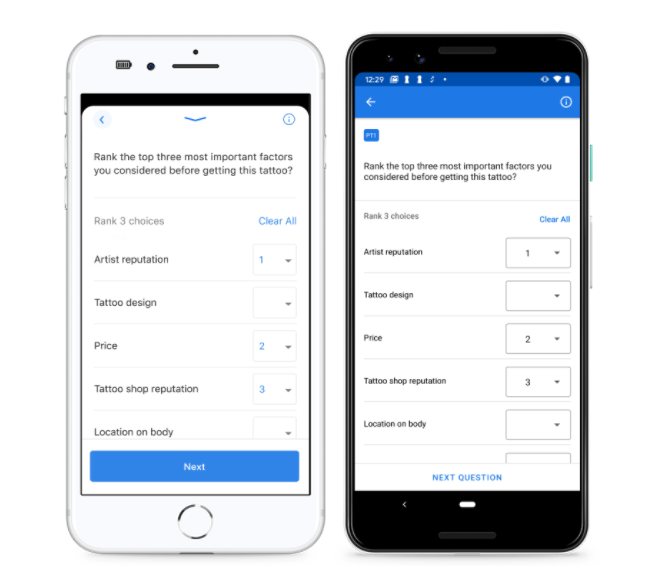 ***Pro tip:*** *Read the directions carefully to fully understand how the response choices should be ranked (e.g. best to worst, favorite to least favorite, etc.)*
## Media questions
Media questions ask you to submit a video or image about a specific topic. For video questions, the length of the video will be determined by your study leader and communicated in the question prompt.
***Pro tip:*** *Read the directions carefully to fully understand how the response choices should be ranked (e.g. best to worst, favorite to least favorite, etc.)*
## Media questions
Media questions ask you to submit a video or image about a specific topic. For video questions, the length of the video will be determined by your study leader and communicated in the question prompt.
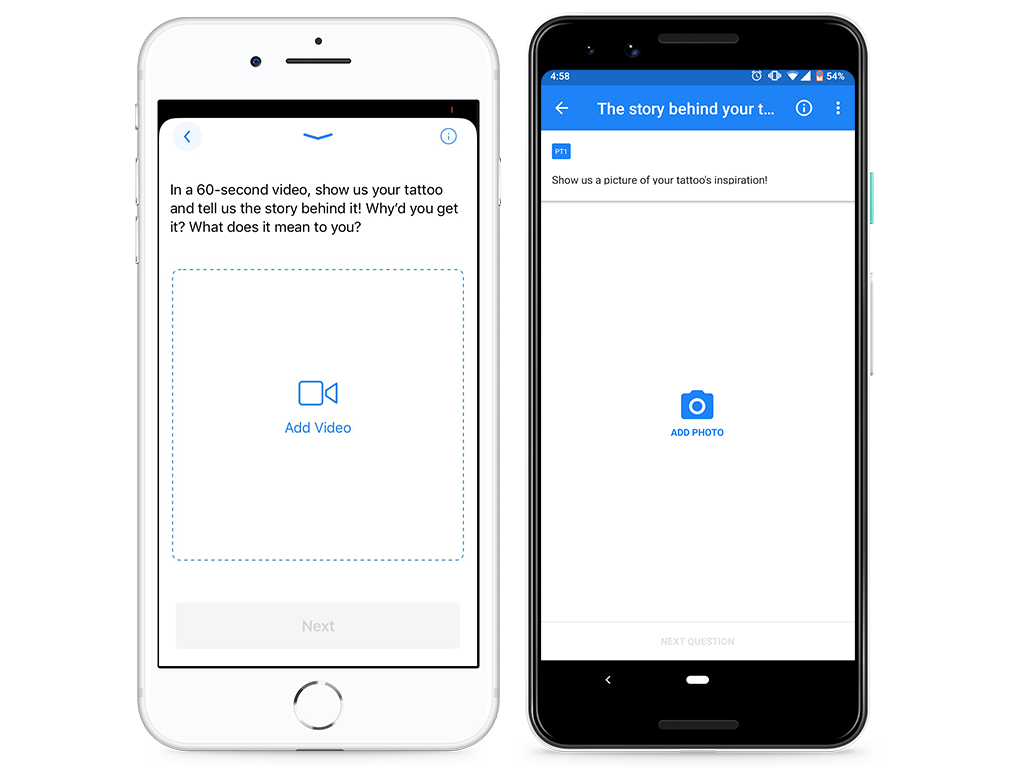 **Photo questions**
Submit a photo or screenshot of something. Researchers may ask you to submit up to 5 different photos for a particular entry.
**Video questions**
Take a selfie or outward-facing video about a specific topic. The length of the video (30 seconds - 5 minutes) will be determined by your study leader and communicated in the question prompt.
***Pro tip**: When you to add a video or photo, you'll have the option of completing the task in real-time. For example, you'll be able to take a picture or video using the mobile app's camera feature. However, if you already have a video pre-recorded or a picture already taken, you can choose to upload from your phone's media storage. Please note that this will require you to give Dscout permission to access your media. Read more about granting permissions* [*here*](/account-settings/app-settings/dscout-scout-app-permissions.md)*.*
## Screen recording questions
Screen recording questions ask you to share your thoughts aloud while recording your screen on your mobile device. For these questions, please note that you'll be recording everything on your screen while talking out loud.
When you encounter a screen recording question, you'll be shown a tutorial on how to screen record. In case you need a refresher, here's what you'll see depending on your device type!
**All Android devices with Dscout app version 4.19.0 and above**
**iPhone 8 and below with Dscout app version 3.76 and above**
**iPhone X and above with Dscout app version 3.76 and above**
***Pro tip**: For privacy concerns, you'll have the chance to close out any personal and private information before hitting the **Start Recording** button. When recording your screen, please make sure you speak loudly and clearly.*
## Scale questions
Scale questions ask you to respond to a prompt using a rating system.
**Photo questions**
Submit a photo or screenshot of something. Researchers may ask you to submit up to 5 different photos for a particular entry.
**Video questions**
Take a selfie or outward-facing video about a specific topic. The length of the video (30 seconds - 5 minutes) will be determined by your study leader and communicated in the question prompt.
***Pro tip**: When you to add a video or photo, you'll have the option of completing the task in real-time. For example, you'll be able to take a picture or video using the mobile app's camera feature. However, if you already have a video pre-recorded or a picture already taken, you can choose to upload from your phone's media storage. Please note that this will require you to give Dscout permission to access your media. Read more about granting permissions* [*here*](/account-settings/app-settings/dscout-scout-app-permissions.md)*.*
## Screen recording questions
Screen recording questions ask you to share your thoughts aloud while recording your screen on your mobile device. For these questions, please note that you'll be recording everything on your screen while talking out loud.
When you encounter a screen recording question, you'll be shown a tutorial on how to screen record. In case you need a refresher, here's what you'll see depending on your device type!
**All Android devices with Dscout app version 4.19.0 and above**
**iPhone 8 and below with Dscout app version 3.76 and above**
**iPhone X and above with Dscout app version 3.76 and above**
***Pro tip**: For privacy concerns, you'll have the chance to close out any personal and private information before hitting the **Start Recording** button. When recording your screen, please make sure you speak loudly and clearly.*
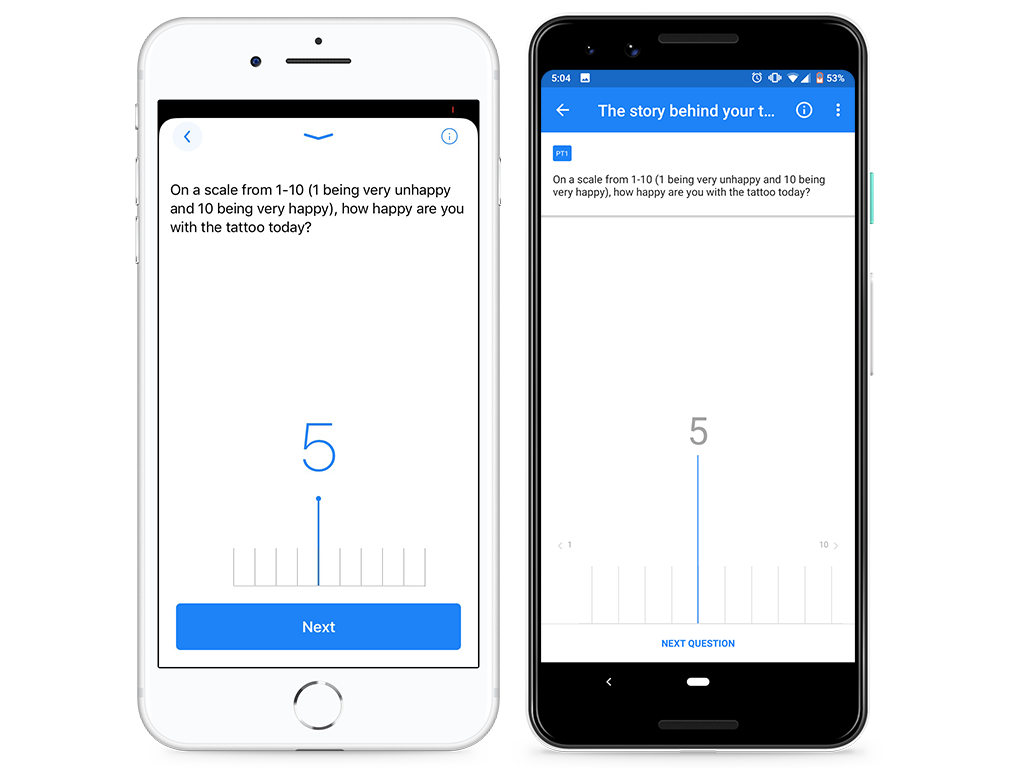
## Scale questions
Scale questions ask you to respond to a prompt using a rating system.
 ## Number questions
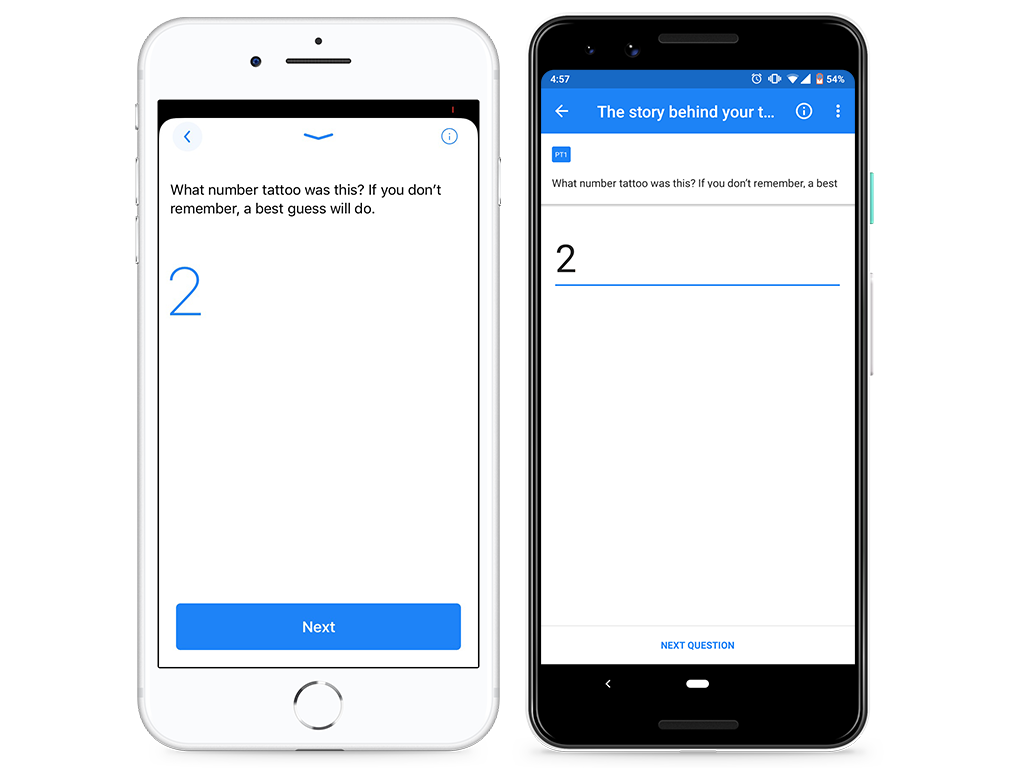
Number questions ask you a question to which you can only respond with a number.
## Number questions
Number questions ask you a question to which you can only respond with a number.
 ## Checkpoints
Checkpoints aren't technically question types, but you may encounter them throughout a study. Checkpoints allow our study leaders to provide further instruction throughout the study and don't require you to do anything other than read the text.
## Questions with question stimuli
Some question types will have images at the beginning of the prompt. These types of questions are designed for scenarios when you need to review one or several images, then respond and react to what you were shown. In order to complete these questions, you'll first need to expand and scroll through all images; then, you'll be able to respond and move to the next question.
---
# Agent Instructions
This documentation is published with GitBook. GitBook is the documentation platform designed so that both humans and AI agents can read, navigate, and reason over technical content effectively. Learn more at gitbook.com.
## Querying This Documentation
If you need additional information that is not directly available in this page, you can query the documentation by asking a question.
Perform an HTTP GET request on the following URL with the `ask` and `goal` query parameters:
```
GET https://participanthelp.dscout.com/diary-studies/participate-in-diary-studies/what-kinds-of-questions-do-i-answer-in-studies-and-applications.md?ask=&goal=
```
`ask` is the immediate question: it should be specific, self-contained, and written in natural language.
`goal` is what the user is ultimately trying to achieve, the reason they need the answer. Sharing it helps GitBook give you a better, more relevant answer. A goal is most helpful when it describes the outcome the user wants rather than restating the question. For example, with `ask=how do I create an API token`, a goal like `automate deployments from our CI pipeline` lets GitBook tailor the answer to that use case.
The response will contain a direct answer to the question and relevant excerpts and sources from the documentation.
Use this mechanism when the answer is not explicitly present in the current page, you need clarification or additional context, or you want to retrieve related documentation sections.
## Checkpoints
Checkpoints aren't technically question types, but you may encounter them throughout a study. Checkpoints allow our study leaders to provide further instruction throughout the study and don't require you to do anything other than read the text.
## Questions with question stimuli
Some question types will have images at the beginning of the prompt. These types of questions are designed for scenarios when you need to review one or several images, then respond and react to what you were shown. In order to complete these questions, you'll first need to expand and scroll through all images; then, you'll be able to respond and move to the next question.
---
# Agent Instructions
This documentation is published with GitBook. GitBook is the documentation platform designed so that both humans and AI agents can read, navigate, and reason over technical content effectively. Learn more at gitbook.com.
## Querying This Documentation
If you need additional information that is not directly available in this page, you can query the documentation by asking a question.
Perform an HTTP GET request on the following URL with the `ask` and `goal` query parameters:
```
GET https://participanthelp.dscout.com/diary-studies/participate-in-diary-studies/what-kinds-of-questions-do-i-answer-in-studies-and-applications.md?ask=&goal=
```
`ask` is the immediate question: it should be specific, self-contained, and written in natural language.
`goal` is what the user is ultimately trying to achieve, the reason they need the answer. Sharing it helps GitBook give you a better, more relevant answer. A goal is most helpful when it describes the outcome the user wants rather than restating the question. For example, with `ask=how do I create an API token`, a goal like `automate deployments from our CI pipeline` lets GitBook tailor the answer to that use case.
The response will contain a direct answer to the question and relevant excerpts and sources from the documentation.
Use this mechanism when the answer is not explicitly present in the current page, you need clarification or additional context, or you want to retrieve related documentation sections.