> For the complete documentation index, see [llms.txt](https://participanthelp.dscout.com/llms.txt). Markdown versions of documentation pages are available by appending `.md` to page URLs; this page is available as [Markdown](https://participanthelp.dscout.com/account-settings/app-settings/enabling-notifications.md).
# Enabling notifications
When you first download the Dscout mobile app, your notifications should already be enabled. If you want to change your notification settings, however, you can do so by accessing your mobile device's native **Settings** app.
### Enabling push notifications on Android devices
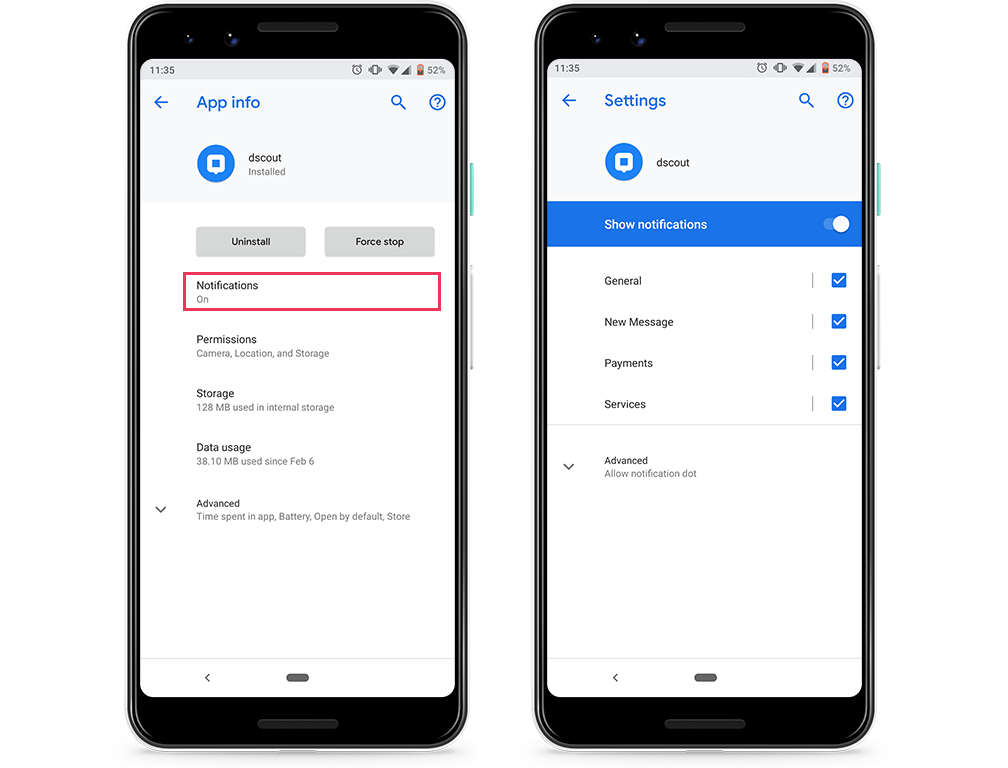
Since not all Android devices are the same, the following steps are a generalized approach to managing Dscout in-app notifications on your mobile device:
1. Tap on your mobile device’s native **Settings** app.
2. Find **Apps & Notifications** (*please note*\_:\_ the name of this section might not be the same for every Android device, but it’ll be similar).
3. Find the **Dscout mobile app** and tap on it.
4. There should be a section called **Notifications** within the app settings. Once found, tap on it.
5. Tap allow for all the fields you want notifications for within the Dscout mobile app. Please note that the notification options will only be available for devices operating on Android 8 or above.
 #### **Notification option definitions**
**Notification**
**Meaning**
General
Enabling notifications for **General** will send you a push notification every time a new study is available for you to apply to. In addition, it'll also send you a notification when a new activity is open and when you've been invited to a new study.
New Message
Enabling notifications for **New Message** will send you a notification every time your study leader sends you a message in the app.
Payments
Enabling notifications for **Payments** will send you a notification every time you receive a reward from Dscout.
Services
Enabling notifications for **Services** will surface notifications for our services that need to run in the background.
### Enabling push notifications on iOS devices
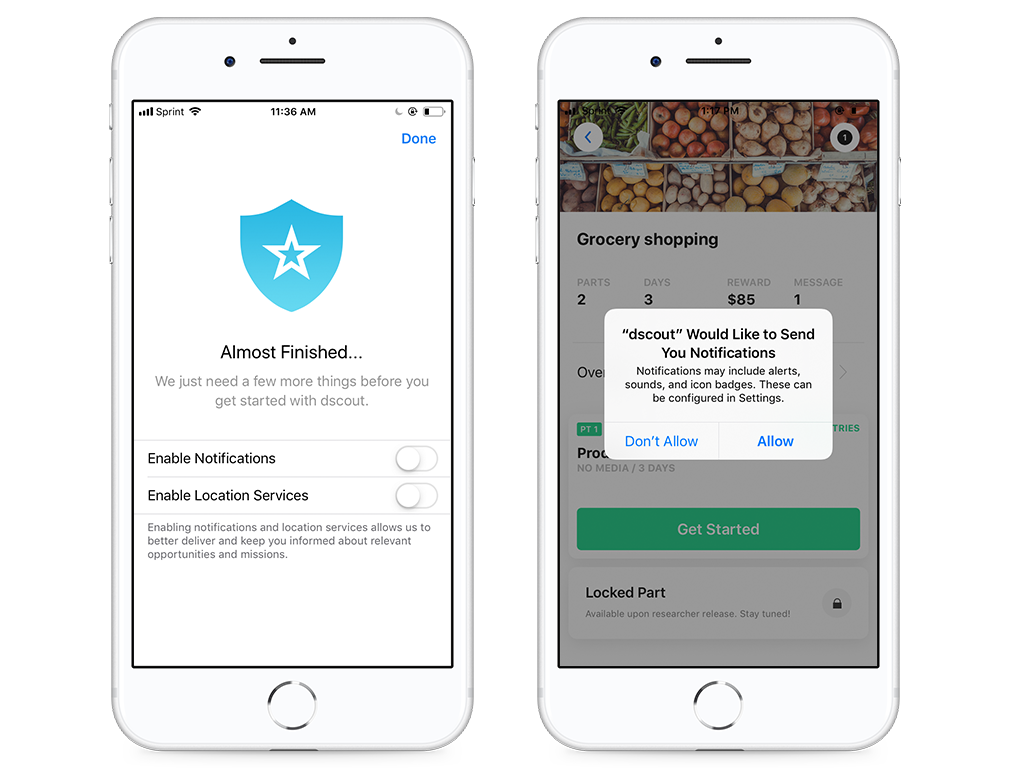
When you download the Dscout app, you'll be prompted to enable **Notifications** and **Location Services**. If you didn't enable notifications at this point, you may be prompted again when using the app, at which point you can click **Allow** to enable notifications. See the screen below.
#### **Notification option definitions**
**Notification**
**Meaning**
General
Enabling notifications for **General** will send you a push notification every time a new study is available for you to apply to. In addition, it'll also send you a notification when a new activity is open and when you've been invited to a new study.
New Message
Enabling notifications for **New Message** will send you a notification every time your study leader sends you a message in the app.
Payments
Enabling notifications for **Payments** will send you a notification every time you receive a reward from Dscout.
Services
Enabling notifications for **Services** will surface notifications for our services that need to run in the background.
### Enabling push notifications on iOS devices
When you download the Dscout app, you'll be prompted to enable **Notifications** and **Location Services**. If you didn't enable notifications at this point, you may be prompted again when using the app, at which point you can click **Allow** to enable notifications. See the screen below.
 You can also update push notification permissions by navigating to the **Profile** tab in your Dscout app:
1. Click on the **Profile** tab (bottom right corner of the app)
2. Scroll down until you reach **App Permissions**.
3. Use the toggles to update your notifications accordingly.
---
# Agent Instructions
This documentation is published with GitBook. GitBook is the documentation platform designed so that both humans and AI agents can read, navigate, and reason over technical content effectively. Learn more at gitbook.com.
## Querying This Documentation
If you need additional information that is not directly available in this page, you can query the documentation dynamically by asking a question.
Perform an HTTP GET request on the current page URL with the `ask` query parameter, and the optional `goal` query parameter:
```
GET https://participanthelp.dscout.com/account-settings/app-settings/enabling-notifications.md?ask=&goal=
```
`ask` is the immediate question: it should be specific, self-contained, and written in natural language.
`goal` is optional and describes the broader end goal you are ultimately trying to accomplish on behalf of the user. GitBook uses it to tailor the answer towards what is most useful for that goal.
The response will contain a direct answer to the question and relevant excerpts and sources from the documentation.
Use this mechanism when the answer is not explicitly present in the current page, you need clarification or additional context, or you want to retrieve related documentation sections.
You can also update push notification permissions by navigating to the **Profile** tab in your Dscout app:
1. Click on the **Profile** tab (bottom right corner of the app)
2. Scroll down until you reach **App Permissions**.
3. Use the toggles to update your notifications accordingly.
---
# Agent Instructions
This documentation is published with GitBook. GitBook is the documentation platform designed so that both humans and AI agents can read, navigate, and reason over technical content effectively. Learn more at gitbook.com.
## Querying This Documentation
If you need additional information that is not directly available in this page, you can query the documentation dynamically by asking a question.
Perform an HTTP GET request on the current page URL with the `ask` query parameter, and the optional `goal` query parameter:
```
GET https://participanthelp.dscout.com/account-settings/app-settings/enabling-notifications.md?ask=&goal=
```
`ask` is the immediate question: it should be specific, self-contained, and written in natural language.
`goal` is optional and describes the broader end goal you are ultimately trying to accomplish on behalf of the user. GitBook uses it to tailor the answer towards what is most useful for that goal.
The response will contain a direct answer to the question and relevant excerpts and sources from the documentation.
Use this mechanism when the answer is not explicitly present in the current page, you need clarification or additional context, or you want to retrieve related documentation sections.